FLEET Mira documentation
FLEET Mira brings device operations, compliant tachograph archiving, driver-card and vehicle-unit analysis, fleet records, driving-licence checks, deadlines, finance documents and verified cloud backup into one Windows application.
Download – version 1.1.0-beta6
Current prerelease: FLEET Mira 1.1.0-beta6, finalised on 25 July 2026 for Windows x64.
Download Enterprise application setup
Download Enterprise PostgreSQL Server setup
Basic/Pro is restricted to local Windows 10/11 console sessions and local SQLite storage. Enterprise uses PostgreSQL and supports Windows Server and terminal-server environments. Follow the Enterprise installation guide before using either Enterprise setup.
Basic/Pro checksums · Enterprise checksums · Release notes and all files
Unsigned beta release
The setups are not yet code-signed, so Windows SmartScreen may display a warning. Enterprise background work runs in the standalone FleetMiraWorker Windows service; clients do not start an integrated worker. Microsoft Entra ID SSO is Beta and has not yet been validated end to end with a real customer tenant. A local emergency administrator must remain available.
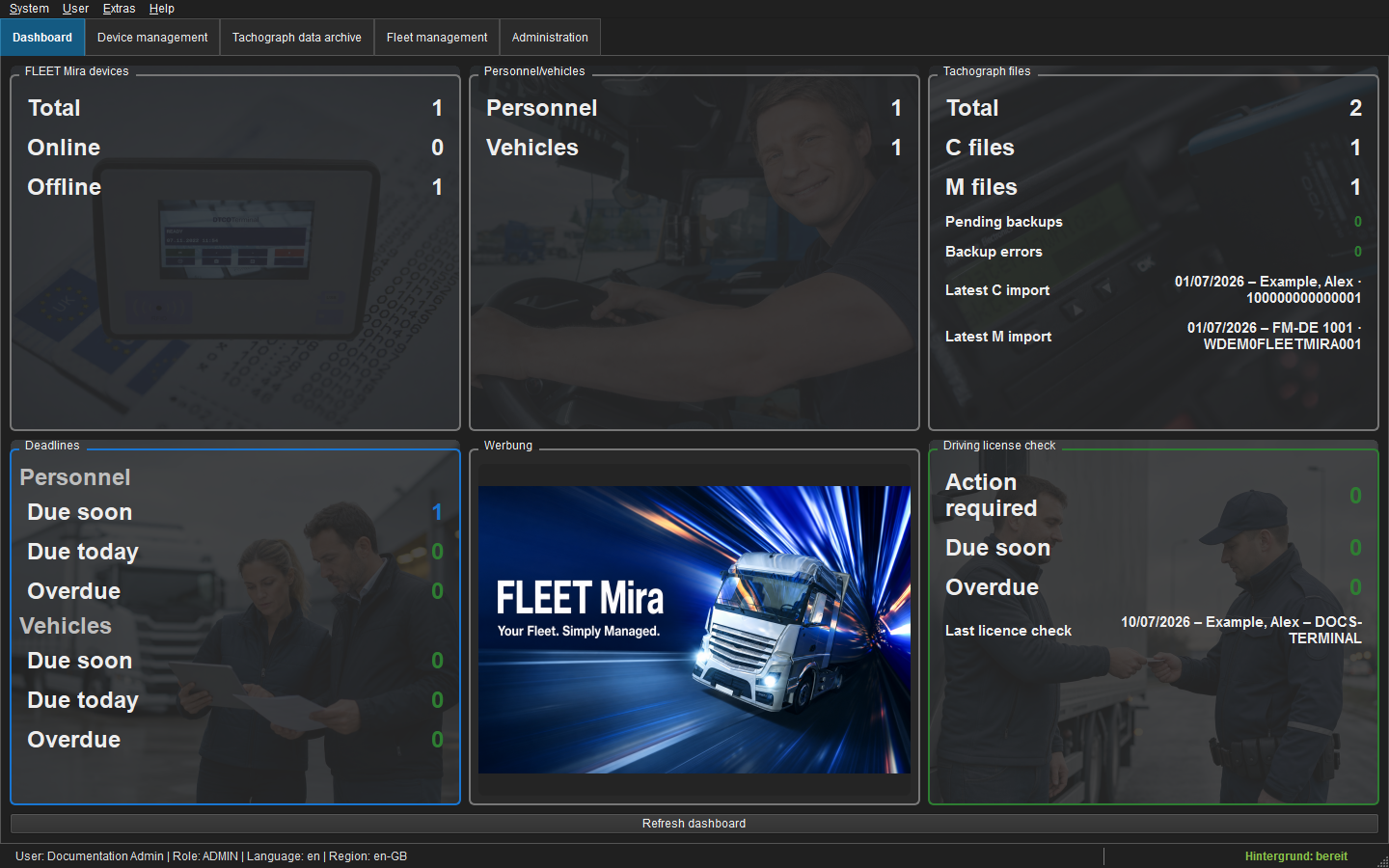 Figure: FLEET Mira start dashboard with anonymised demonstration data.
Key features
FLEET Mira combines compliant tachograph-data processes, fleet management, cost control and traceable compliance workflows in one central application. Its key capabilities include:
- Tachograph-data archiving and analysis
- automated recursive import of C/M files from USB removable drives (Pro 💎)
- day and week charts for personnel and vehicles
- interactive maps for position data
- technical infringement evaluation under Regulation (EC) No 561/2006
- cryptographic signature verification for driver cards and vehicle units
- audit trail for EU and German FPersV procedures
- support for current Smart Tachograph 2 data:
- border crossings
- loading and unloading operations
- load type
- authenticated GNSS positions
- Generation 2 Version 2 files
- 56-day data structures of new driver cards
- Fleet Management
- RFID-assisted driving-licence checks
- personnel due-date management, including driver cards, professional-driver qualification and ADR
- vehicle due-date management, including tachograph calibration, statutory inspections and service
- cost controlling, KPIs and TCO (Total Cost of Ownership)
- fixed operating costs such as insurance and tax
- variable operating costs such as maintenance and repairs
- XRechnung and e-invoice import with audit-ready original-document storage
- reporting:
- cost per vehicle
- cost per kilometre
- fixed and variable costs
- time and period comparisons
- audit trail for GoBD-compliant procedures
- Users and roles with granular permissions and optional two-factor authentication (2FA)
- Multilingual and regional formatting
- Languages: Deutsch, English, Français, Italiano, Español, Português, Polski, Română, Nederlands, Dansk, Čeština, Magyar, Slovenščina, Hrvatski, Suomi, Norsk bokmål, Svenska, Latviešu, Lietuvių, Eesti, Slovenčina, Български and Ελληνικά
- Regions: Germany (
de-DE), Austria (de-AT), Switzerland (de-CH), United Kingdom (en-GB), United States (en-US), France (fr-FR), Italy (it-IT), Spain (es-ES), Portugal (pt-PT), Poland (pl-PL), Romania (ro-RO), Netherlands (nl-NL), Denmark (da-DK), Czechia (cs-CZ), Hungary (hu-HU), Slovenia (sl-SI), Croatia (hr-HR), Finland (fi-FI), Norway (nb-NO), Sweden (sv-SE), Latvia (lv-LV), Lithuania (lt-LT), Estonia (et-EE), Slovakia (sk-SK), Bulgaria (bg-BG) and Greece (el-GR)
- Optional backup of local tachograph and financial archives plus the database to filesystem, WebDAV or Google Drive targets, including restore workflows
- Application-wide auditing with one central, filterable audit log
- Complete compliance history for imports, checks, assignments, changes and exports
- GDPR-compliant data processing through role-based access, protected credentials and traceable procedures
Choose your path
| Audience | Start here | Contents |
|---|---|---|
| End users | User manual | Daily workflows, lists, records, analyses, documents and troubleshooting |
| Administrators | Administrator and integrator guide | Deployment, users, services, security, audit, logs and maintenance |
| API integrators | DriverCard REST and Accounting REST | Endpoints, payloads, idempotency and error handling |
| Finance integrators | Accounting CSV/ZIP | Archive layout and field-level contracts |
| Operations teams | Archiving, backup and restore | local primary archives, filesystem/cloud backup, snapshots and disaster recovery |
Key principles
- Original C and M files remain byte-for-byte traceable through hashes and the immutable local archive.
- Signature results are stored per signed section; invalid or unverifiable files are quarantined without being deleted.
- Business changes and automatic imports are recorded in the global audit log.
- All tachograph calculations use UTC. Region settings change formatting only.
- Optional backup is one-way from the local primary archives to one configured target.
- Locally verified financial originals can be verified and booked independently of backup status.
- UI layout, language and region are stored per user.
Product and legacy names
FLEET Mira is the visible product name. Technical identifiers such as DLTNGDownloadTool.spec, database tables, API paths, existing configuration keys and the backup prefix DLTNG/<installation-id>/... remain unchanged for compatibility. They must not be renamed in an existing installation.
Documentation status
The documentation follows the current application menus and implemented services. Screenshots use a reproducible, isolated demonstration profile; they contain no production DDD files, credentials, URLs or personal records.